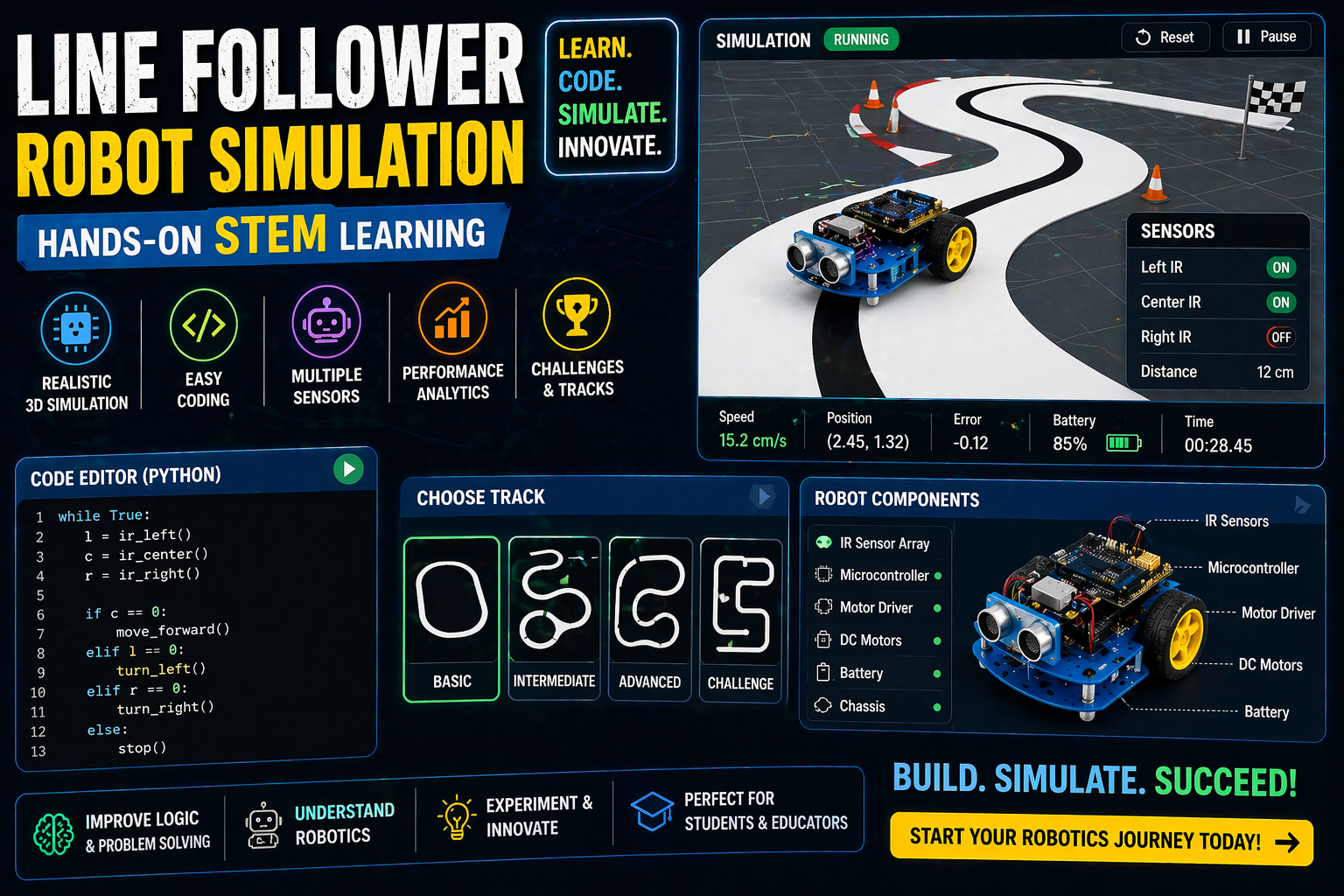
Struggling to find a way to teach robotics for class 8 students that’s engaging, hands-on, and budget-friendly? The SPYRAL Robotics Lab lets you build and code robots online—no kit, no installs, and no classroom clutter. Whether you’re a student curious about humanoid robot projects or a teacher looking for NEP 2020-aligned robotics projects, this virtual lab makes it possible. Dive into 3D simulations where you assemble, wire, and program robots like a pro—all from your browser.
Why This Matters: Robotics for Class 8 Students in India’s Classrooms
In India, robotics isn’t just about coding—it’s about building curiosity and solving real-world problems. With the NEP 2020 emphasizing experiential learning, students need interactive platforms that turn abstract concepts into tangible experiments. For Class 8 students, robotics isn’t just about following instructions; it’s about inventing, experimenting, and iterating—skills that prepare them for STEM careers and beyond.
Imagine a classroom where students don’t just read about simulations or watch videos—they build a line follower robot that navigates a virtual track, or program an obstacle-avoiding robot using an HC-SR04 ultrasonic sensor. This isn’t just learning; it’s discovery. And the best part? It’s all possible without buying a single physical component.
The Power of Virtual Robotics Labs for Class 8 Students
Virtual robotics labs like SPYRAL’s are revolutionizing how students learn robotics for class 8 students. Here’s why they’re a game-changer:
- No Kit Required: Forget about spending hours assembling kits or dealing with broken parts. Everything you need is right in your browser.
- Hands-On Coding: Write code in a visual block editor or dive into Arduino’s native language—both options are available to help students grasp programming fundamentals.
- Instant Feedback: Test your robot’s logic in real time. Does your line follower wobble? Adjust the code and watch it improve—no waiting for physical parts to arrive.
- Curriculum-Aligned: Designed to meet CBSE and ICSE standards, these labs cover everything from basic electronics to advanced robotics concepts.
- Safe and Accessible: No risk of damaging expensive equipment. Students can experiment endlessly without fear of breaking anything.
Why Students Love It
For students, virtual robotics labs feel like playing with real robots. The 3D environment makes it easy to visualize how components like motors, sensors, and servos work together. Whether you’re debugging a humanoid robot project or tweaking the code for an ESP32-powered rocket, the instant feedback keeps them engaged and motivated.
Why Teachers Love It
For teachers, these labs save time and reduce stress. No more managing limited lab resources or waiting for students to finish their projects. With SPYRAL’s teacher dashboard, you can track progress, generate quizzes, and even create custom assignments—all in one place. Plus, the labs align with NCERT and CBSE guidelines, making it easy to integrate into your lesson plans.
Exploring Robotics Projects for Class 8 Students
Ready to dive into robotics projects for class 10 students (and Class 8 too!)? SPYRAL’s Robotics Lab offers six exciting projects to explore:
- Line Follower Robot: Build a robot that steers itself along a black-and-white track using IR sensors. Perfect for learning about PWM and motor control.
- Obstacle-Avoiding Robot: Program a robot to detect obstacles using an HC-SR04 ultrasonic sensor and navigate around them. Great for understanding ultrasonic sensor projects and distance measurement.
- Robotic Arm: Design and control a robotic arm with servos. Students can write their own equations for torque and grip force, making it a fantastic project for math and physics integration.
- Humanoid Robot: Build a 10-servo humanoid that walks, balances, and responds to its environment. Ideal for exploring IMU sensors and servo mechanics.
- Rocket: Code a two-stage rocket with an ESP32 flight computer. Learn about staging, apogee, and parachute deployment—perfect for aspiring aerospace engineers!
- Nano Drone: Simulate a drone’s flight dynamics and control systems. Great for students interested in drones and automation.
How Do Humanoid Robots Balance?
One of the most fascinating projects in the lab is the humanoid robot. Balancing is achieved through a combination of physics and programming:
- IMU Sensor: The Inertial Measurement Unit (IMU) detects the robot’s tilt and orientation in real time.
- Servo Control: The robot adjusts its servo motors to counteract any tilt, keeping its center of gravity stable.
- Friction and Torque Limits: The simulation models real-world physics, including how friction affects movement and how torque limits prevent the robot from tipping over.
- Feedback Loop: The robot continuously adjusts its posture based on sensor data, creating a dynamic balancing act.
In the lab, you can experiment with different servo speeds, friction levels, and even gravity settings to see how they affect balance. It’s a hands-on way to understand center of mass and stability—key concepts in physics and robotics!
The HC-SR04 Ultrasonic Sensor: A Student’s Best Friend
For students exploring ultrasonic sensor robot projects, the HC-SR04 is a game-changer. This sensor emits ultrasonic waves and measures the time it takes for the echo to return, allowing the robot to calculate the distance to an object. The formula for distance is simple but powerful:
Distance (cm) = (Time × 0.034) / 2
In the obstacle-avoiding robot project, students can see how the sensor detects obstacles and triggers the robot to stop or change direction. It’s a practical example of how sensors translate real-world data into actionable code.
Try It Live: Build a Robot in 3D
Try This Simulation Free
Open the interactive simulation on anAIza School — no download, no signup needed.
Open Simulation →Assemble the robot, wire the components, and write code to make it follow the track. Change the IR sensor sensitivity or motor speed—see how it affects performance in real time.