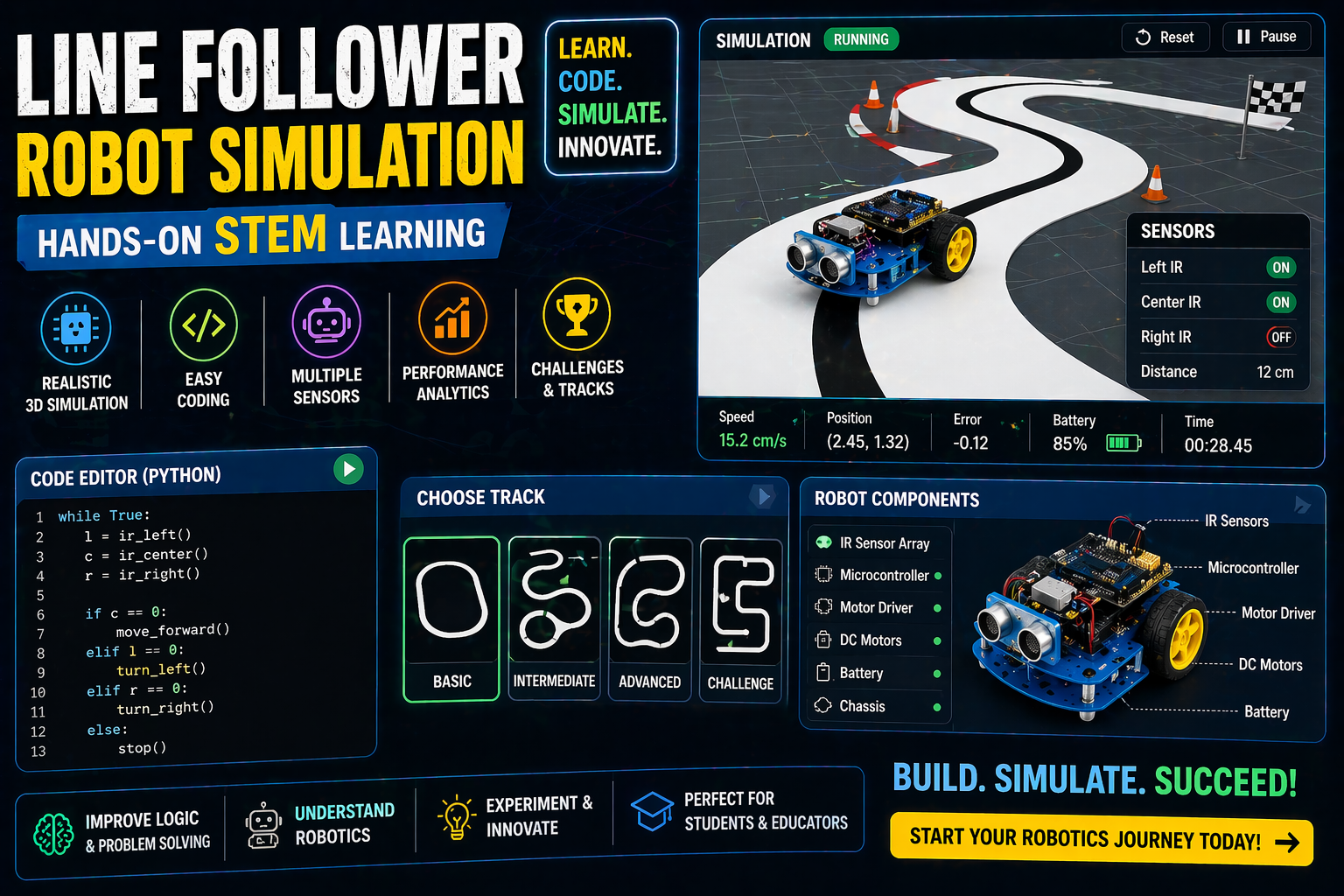
Frustrated by the delay of robotics kits arriving or the high cost of setting up a school lab? Imagine building a line follower robot or programming an obstacle avoider—all in your browser, with no physical components needed. Welcome to the future of robotics learning: a virtual robotics lab where students in India can design, wire, and code robots like never before. Whether you're a Class 6 student curious about STEM or a teacher looking for an Atal Tinkering Lab alternative, this 2026 guide shows you how to dive into interactive robotics simulations without leaving your desk.
No more waiting for parts or expensive equipment. With SPYRAL’s browser-based robotics lab, you can explore the world of robotics—from simple line followers to complex humanoids—aligned with CBSE, ICSE, and NEP 2020 standards. Let’s turn your curiosity into action!
Why This Matters: Robotics Learning Without Limits in India
In India, robotics education is no longer a luxury—it’s a necessity. With the National Education Policy (NEP) 2020 emphasizing experiential learning, schools are scrambling to integrate hands-on STEM activities. However, setting up a traditional robotics lab is costly, time-consuming, and often impractical for classrooms with limited resources. That’s where a virtual robotics lab changes the game.
For students, it means building and coding robots online without worrying about broken parts or missing components. For teachers, it’s a game-changer—no need to wait for kits or manage inventory. And for schools, it’s a scalable solution that fits within budget constraints while aligning with CBSE and NEP 2020 requirements. Whether you’re in a bustling Mumbai school or a rural Andhra Pradesh classroom, robotics is now accessible to all.
No Kit, No Problem: How a Virtual Robotics Lab Works
A virtual robotics lab is an online platform where students can build, wire, and code robots using interactive 3D simulations. Unlike traditional labs that require physical components, this digital space replicates the entire robotics workflow—from assembling parts to writing code—all in your browser. Here’s how it works:
- Build in 3D: Drag and drop components like motors, sensors, and servos to construct robots such as a line follower or obstacle avoider.
- Wire virtually: Connect sensors, motors, and microcontrollers (like Arduino) using intuitive wiring diagrams.
- Code interactively: Write code using block-based programming or Arduino IDE to control your robot’s behavior.
- Test in real time: Run simulations to see how your robot responds to different scenarios—no physical setup required.
This approach eliminates the barriers of traditional robotics labs, making it perfect for online robotics simulator free access in schools across India.
Why Choose a Browser-Based Lab Over Physical Kits?
Traditional robotics kits can be expensive, fragile, and require maintenance. A 3D robotics simulator online offers several advantages:
- Cost-effective: No need to purchase physical components or worry about replacements.
- Instant access: Start building and coding robots immediately—no waiting for deliveries.
- Scalable: Multiple students can use the lab simultaneously without sharing physical resources.
- Safe and controlled: Experiment with complex robots (like a humanoid or rocket) without the risk of damage.
- NEP 2020 compliant: Aligns with the policy’s focus on experiential and project-based learning.
For schools looking for an Atal Tinkering Lab alternative, this virtual lab is a practical and affordable solution.
Meet the Robots You Can Build in the Virtual Lab
SPYRAL’s virtual robotics lab lets you explore six different robots, each with unique challenges and learning outcomes. Here’s a sneak peek:
- Line Follower: Navigate a black line using IR sensors and motors. Ideal for learning basic control algorithms and sensor integration.
- Obstacle Avoider: Detect and dodge obstacles using an ultrasonic sensor. Perfect for understanding distance measurement and decision-making logic.
- Robotic Arm: Control a multi-joint arm to pick and place objects. Great for exploring kinematics and torque calculations.
- Humanoid: Build a walking robot with servos and an IMU. Challenge yourself with balance, friction, and servo torque limits.
- Rocket: Design a two-stage rocket with an ESP32 flight computer. Learn about staging, apogee, and parachute deployment.
- Nano Drone: Program a small drone to navigate and avoid obstacles. Introduces aerodynamics and flight control basics.
Each robot is designed to teach fundamental concepts while keeping students engaged. The line follower and obstacle avoider are available for free with a basic account, while the rest unlock with a paid plan.
How the Line Follower Robot Works
The line follower is a classic robotics project that teaches students about sensors, motors, and control logic. Here’s how it functions:
- Components: Arduino Uno, L298N motor driver, two IR sensors, two DC motors, and a 7.4V LiPo battery.
- Sensors: The IR sensors detect the black line on a white surface. When the robot senses the line, it adjusts motor speeds to stay centered.
- Motors: The L298N driver controls the DC motors, which turn the wheels. By varying the speed of each motor, the robot steers left or right.
- Coding: Students write code to read sensor values and adjust motor speeds. For example, if the left sensor detects the line but the right one doesn’t, the right motor speeds up to turn left.
This project is perfect for beginners and aligns with CBSE Class 8–10 robotics and physics curricula.
Try This Simulation Free
Open the interactive simulation on anAIza School — no download, no signup needed.
Open Simulation →Assemble the line follower, wire the sensors, and code it to follow the path. See how small changes in motor speed affect its trajectory!