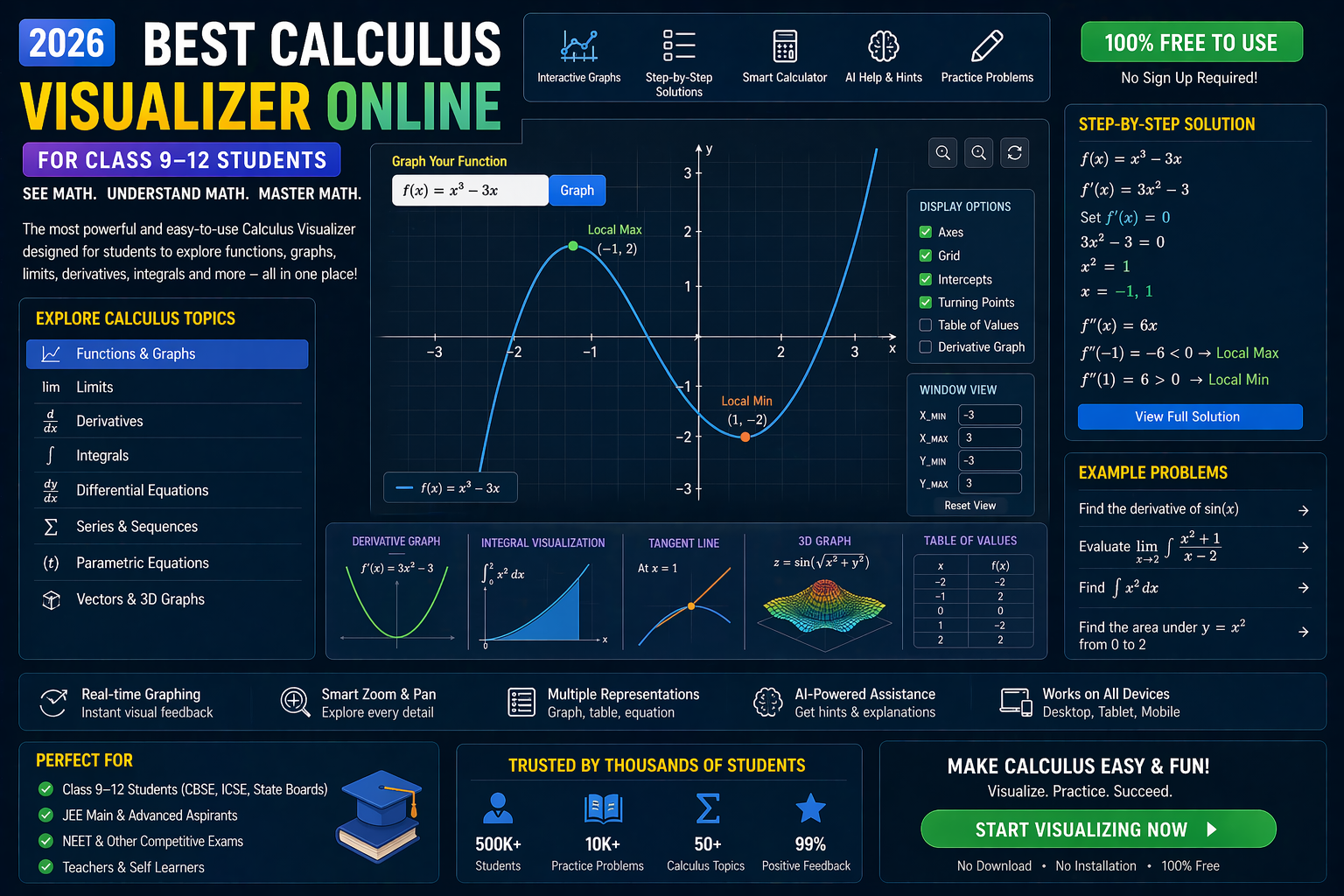
If you're a Class 12 CBSE student staring at an integration problem thinking, "Why isn't this clicking?" — you're not alone. Integration isn't just about memorizing formulas; it's about seeing how areas under curves behave, how substitutions work, and how limits transform. That's why an interactive integration visualizer is the game-changer you need. With AI-powered simulations, you can manipulate functions, watch areas fill up in real time, and understand the why behind every step — not just the how. This isn't just another online tool; it's your personal math lab that adapts to your pace, explains every move, and prepares you for JEE, NEET, and board exams like never before.
Teachers, imagine your students seeing the Fundamental Theorem of Calculus come alive instead of just hearing about it. With NEP 2020 emphasizing experiential learning, these simulations align perfectly with competency-based education — turning abstract calculus into tangible understanding. Ready to see integration like you've never seen it? Let's dive in.
Why This Matters: Integration Isn't Just a Formula — It's a Story
For decades, integration in CBSE Class 12 Maths has been taught through chalk-and-talk: "Here's the formula, here's a solved example, now practice 20 problems." But calculus isn't a recipe — it's a narrative. When you integrate x² from 0 to 2, you're not just computing 8/3; you're measuring the area under a parabola. When you use integration by parts, you're not following a rule — you're balancing two functions against each other.
That's where interactive simulations change everything. Instead of staring at static diagrams in textbooks, you can:
- Drag the limits of integration and watch the shaded area grow or shrink in real time.
- Twist the function — change sin(x) to cos(x) or x² to eˣ — and see how the integral responds instantly.
- Break it down using the "what-if" mode: What if I change the substitution? What if I split the integral? What if I use a different method?
- Get AI explanations after every step: "You used u-substitution here. Why did you choose u = x² + 1? Let's see what happens if we choose u = x instead."
This isn't just learning — it's discovery. And with NEP 2020 pushing for experiential learning, these tools are no longer optional; they're essential.
Visual Integration Solver: See the Area Fill Up Before Your Eyes
One of the most powerful ways to understand integration is through area visualization. When you compute ∫₀² x² dx, you're finding the area under y = x² from x=0 to x=2. But do you see it? With a definite integral visualizer, you do.
Here's what you can do with this simulation:
1. Draw Any Function
Type in any function: x², sin(x), eˣ, √x, or even piecewise functions. The graph updates instantly. Want to see what ∫₀¹ √(1−x²) dx looks like? It's the quarter-circle — and you can see it being shaded as you drag the upper limit.
2. Adjust the Limits
Slide the left and right sliders. Watch the shaded region expand or contract. The numerical value of the integral updates in real time. This is how you feel the effect of changing limits — not just calculate it.
3. Compare Methods
Compute the same integral using different methods: left Riemann sum, right Riemann sum, midpoint rule, trapezoidal rule, and Simpson's rule. See how the approximations converge to the exact value as you increase the number of rectangles. This is the heart of numerical integration — and you can see why Simpson's rule is more accurate.
4. Get AI Feedback
After you compute the integral, the AI doesn't just say "correct" or "incorrect." It explains: "You used the substitution u = 1−x². That's a good choice because the derivative of u is −2x, which appears in the integrand. But what if you tried x = sin(θ)? Let's try that and see what happens."
This level of feedback turns every problem into a learning conversation.
Integration by Parts: Why Choose u and v? Let the AI Show You
Integration by parts can feel like a guessing game: "Which part should I differentiate? Which should I integrate?" The rule is ∫ u dv = uv − ∫ v du — but why does this work? It's the product rule in reverse. And you can see it.
With a matrix operations lab for integration by parts, you can:
1. Choose u and dv
Pick any two functions. Say u = x and dv = eˣ dx. The simulation shows:
- The original function: f(x) = x eˣ
- The product rule breakdown: d/dx(x eˣ) = eˣ + x eˣ
- The integral form: ∫ x eˣ dx = x eˣ − ∫ eˣ dx
2. See the Derivatives and Integrals
The AI displays the derivatives and integrals of u and v in real time. You can see why choosing u = x (which becomes simpler when differentiated) and dv = eˣ dx (which is easy to integrate) leads to a simpler integral. Try choosing u = eˣ and dv = x dx — watch how the new integral becomes more complicated. The simulation doesn't just tell you it's wrong; it shows you why.
3. Experiment with Different Functions
Try u = ln(x), dv = x² dx. See how the logarithmic function simplifies when differentiated. Or try u = sin(x), dv = cos(x) dx — watch the integral oscillate between sine and cosine. This isn't just practice; it's intuition-building.
With AI guidance, you'll learn to recognize the LIATE rule (Logarithmic, Inverse trig, Algebraic, Trigonometric, Exponential) not as a mnemonic, but as a pattern you can see.
Trigonometry Visualizer: Integrate sin²(x) and cos²(x) Without Memorizing
Trigonometric integrals are notorious in CBSE Class 12. Why do we use identities like sin²(x) = (1−cos(2x))/2? Because it turns a hard integral into an easy one. But do you see why this works? With a trigonometry visualizer, you do.
Here's how it helps:
1. Plot sin²(x) and (1−cos(2x))/2
Overlay the two graphs. See how the second function, despite looking different, traces the same curve. This is the identity in action — and you can see it, not just memorize it.
2. Integrate Both
Compute ∫ sin²(x) dx and ∫ (1−cos(2x))/2 dx. The simulation shows both results: (x/2) − (sin(2x))/4 + C. They're identical. This is how you believe the identity — because you've seen it in action.
3. Try Other Identities
Visualize sin(x)cos(x) = (sin(2x))/2. See how the double-angle identity simplifies the integral. Or try 1 + tan²(x) = sec²(x) — watch how it transforms ∫ tan²(x) dx into ∫ (sec²(x)−1) dx, which you can solve easily.
With this visual foundation, trigonometric integrals stop being a memory test and become a puzzle you can solve.
Coordinate Geometry Tool: Integrate Areas Between Curves
One of the most challenging topics in CBSE Class 12 is finding the area between two curves. The formula is straightforward: ∫ [f(x) − g(x)] dx from a to b. But visualizing which function is on top, where they intersect, and how the area changes — that's where students get stuck. A coordinate plotter online solves this.
Here's what you can do:
1. Plot Two Functions
Type in f(x) = x² and g(x) = x. The simulation draws both curves and shades the region between them from x=0 to x=1. You can see that f(x) is above g(x) in this interval.
2. Find Intersection Points
Use the intersection tool to find where f(x) = g(x). The simulation marks the points and updates the integral limits automatically. This is how you see the bounds of integration.
3. Compute the Area
The simulation computes ∫₀¹ (x² − x) dx = −1/6. But area can't be negative! The AI explains: "The integral is negative because g(x) > f(x) in part of the interval. To get the area, take the absolute value or split the integral at the intersection point."
This is the kind of nuance that textbooks skip — but simulations make clear.
Matrix Operations Lab: Solve Systems Using Integration
Yes, you read that right. Integration isn't just about areas and antiderivatives — it's also used in solving differential equations, which often involve systems of equations. With a matrix operations lab, you can see how integration connects to linear algebra.
Here's a practical example:
1. Solve a Differential Equation
Consider dy/dx = 2x + 3. To solve this, you integrate both sides: y = ∫ (2x + 3) dx = x² + 3x + C. But what if the equation is more complex? Say dy/dx = x y. This is a separable equation: dy/y = x dx. Integrate both sides: ln|y| = x²/2 + C. Exponentiate: y = e^(x²/2 + C) = C e^(x²/2).
With the simulation, you can:
- Plot the slope field for dy/dx = x y.
- Draw solution curves for different initial conditions.
- See how the exponential growth depends on the integral of x².
2. Connect to Matrices
For systems like dx/dt = a x + b y, dy/dt = c x + d y, the solution involves matrix exponentials: e^(At). The matrix exponential is defined using a power series that involves integrals. While you won't compute this by hand in Class 12, the simulation shows how integration underlies these advanced concepts.
This is how you see the big picture: integration isn't isolated; it's a thread connecting calculus, algebra, and physics.
Equation Solver CBSE: Step-by-Step with AI Guidance
Let's say you're solving ∫ x eˣ dx. You know integration by parts is the way to go. But how do you choose u and dv? The AI in the equation solver cbse mode guides you:
- Identify parts: The AI highlights x and eˣ. It asks: "Which part simplifies when differentiated?" You choose u = x.
- Compute derivatives and integrals: The AI shows du = dx and ∫ dv = ∫ eˣ dx = eˣ.
- Apply the formula: uv − ∫ v du = x eˣ − ∫ eˣ dx = x eˣ − eˣ + C.
- Verify: The AI differentiates your result and confirms it equals x eˣ.
- Explore alternatives: What if you chose u = eˣ and dv = x dx? The AI shows the new integral becomes ∫ x² eˣ dx, which is more complicated. It explains why your first choice was better.
This isn't just a solver — it's a tutor that adapts to your thinking process. And it works for all types of integrals: trigonometric, exponential, rational, and even improper integrals.
What If You Changed This? 3 Real-World Experiments
Integration isn't just about solving problems — it's about exploring possibilities. Here are three "what-if" scenarios to try in the simulation. Change one variable, and watch the entire outcome transform.
1. What if the limits were reversed?
Compute ∫₀² x² dx and ∫₂⁰ x² dx. The first gives 8/3 ≈ 2.67. The second gives −8/3 ≈ −2.67. The AI explains: "Reversing limits changes the sign of the integral. This is why area is always positive — we take absolute values or ensure the upper limit is greater than the lower limit."
Try it: Drag the sliders to swap the limits. See the shaded region flip, and the value change sign. This is how you feel the Fundamental Theorem of Calculus in action.
2. What if the function had a discontinuity?
Try ∫₀² 1/(x−1) dx. The function has a vertical asymptote at x=1. The simulation shows the area blowing up to infinity on both sides. The AI flags this as an improper integral and asks: "Do you want to split the integral at x=1 and take limits?"
This is how you learn to handle discontinuities — not just memorize a rule.
3. What if you used a different substitution?
Compute ∫ x √(x² + 1) dx. You can use u = x² + 1, giving du = 2x dx, so (1/2) ∫ √u du = (1/3) u^(3/2) + C = (1/3)(x² + 1)^(3/2) + C.
But what if you tried u = √(x² + 1)? The simulation shows the integral becomes ∫ u² du = u³/3 + C = (x² + 1)^(3/2)/3 + C — the same result! The AI celebrates: "Both substitutions work! This shows integration is flexible — there's often more than one path to the solution."
Try It Free on SPYRAL
Everything discussed in this article is available for free on SPYRAL AI Workbench — Maths Visualizations. No signup required for guest access — just open it and start learning.
Explore SPYRAL AI Workbench — Maths Visualizations →Frequently Asked Questions
What is integration in CBSE Class 12 Maths?
Integration in CBSE Class 12 Maths is the process of finding the antiderivative of a function, often used to calculate areas under curves, volumes of solids, and solutions to differential equations. It's the reverse of differentiation and is essential for calculus, physics, and engineering. With interactive simulations, you can see how integration works instead of just memorizing formulas.
How can I visualize integration problems for CBSE Class 12?
You can visualize integration problems using an integration visualizer like the one on SPYRAL AI Workbench. These tools let you plot functions, adjust limits, and watch the area under the curve fill up in real time. You can also experiment with different methods like Riemann sums, trapezoidal rule, and Simpson's rule to see how they approximate the integral.
Is there a free coordinate plotter online for CBSE Class 12 Maths?
Yes! The SPYRAL AI Workbench includes a free coordinate plotter online where you can plot any function, find intersection points, and compute areas between curves. It's designed specifically for CBSE Class 12 Maths and aligns with the NEP 2020 emphasis on experiential learning.
How do I solve integration problems using a trigonometry visualizer?
A trigonometry visualizer helps you see how trigonometric identities simplify integrals. For example, you can plot sin²(x) and (1−cos(2x))/2 on the same graph to see they're identical. Then, integrate both and confirm they give the same result. This visual proof helps you understand why identities like sin²(x) = (1−cos(2x))/2 are useful in integration.
Can I use a matrix operations lab to understand integration by parts?
While matrix operations and integration by parts seem unrelated, the matrix operations lab in SPYRAL AI Workbench helps you see the structure behind integration by parts. It shows how choosing u and dv affects the resulting integral, much like how matrix multiplication affects linear transformations. The AI guides you through the process, helping you understand the LIATE rule visually.
What is the best equation solver CBSE for Class 12 integration?
The best equation solver CBSE for integration is one that doesn't just give the answer but explains each step. SPYRAL AI Workbench's integration solver provides AI-powered explanations, showing why a particular method (substitution, by parts, partial fractions) was chosen and how the result was verified. It's designed to mimic a personal tutor.
How does an integration simulation help with JEE and NEET preparation?
An integration simulation helps with JEE and NEET by making abstract concepts tangible. You can experiment with different functions, methods, and limits, which builds intuition and reduces reliance on memorization. The AI explanations also help you understand the reasoning behind each step, which is crucial for solving complex problems in competitive exams.
Are there interactive simulations for definite integrals in CBSE Class 12?
Yes! The definite integral visualizer on SPYRAL AI Workbench lets you compute definite integrals like ∫₀¹ x² dx or ∫₀^π sin(x) dx and see the area shaded in real time. You can adjust the limits, change the function, and even compare different numerical methods to see how they converge to the exact value.
How can I use a coordinate geometry tool to find areas between curves?
A coordinate geometry tool helps you find areas between curves by plotting two functions, identifying their intersection points, and computing the integral of the difference. The tool shades the region and updates the area value in real time. It also explains why the integral might be negative and how to interpret the result as a positive area.
What are the most common integration formulas in CBSE Class 12?
The most common integration formulas in CBSE Class 12 include:
- ∫ xⁿ dx = x^(n+1)/(n+1) + C (for n ≠ −1)
- ∫ eˣ dx = eˣ + C
- ∫ sin(x) dx = −cos(x) + C
- ∫ cos(x) dx = sin(x) + C
- ∫ sec²(x) dx = tan(x) + C
- ∫ 1/(1+x²) dx = tan⁻¹(x) + C
- Integration by parts: ∫ u dv = uv − ∫ v du
- Integration by substitution: ∫ f(g(x)) g'(x) dx = ∫ f(u) du
With simulations, you can see how these formulas are derived and when to apply them.
How does NEP 2020 support the use of integration simulations in classrooms?
NEP 2020 emphasizes competency-based learning, experiential learning, and the use of technology in education. Integration simulations align perfectly with these goals by turning abstract calculus into hands-on, visual learning. They support differentiated instruction, allowing students to learn at their own pace and teachers to track progress in real time. The AI explanations also help students develop critical thinking and problem-solving skills.
Can I practice integration problems with AI feedback for free?
Yes! The SPYRAL AI Workbench offers free integration practice with AI feedback. You can type in any integral, and the AI will guide you through the solution, explain each step, and even suggest alternative methods. It's like having a personal tutor available 24/7.
What is the difference between definite and indefinite integrals in CBSE Class 12?
An indefinite integral (e.g., ∫ x² dx) gives a family of functions (x³/3 + C) and represents the antiderivative. A definite integral (e.g., ∫₀² x² dx) gives a number (8/3) and represents the signed area under the curve between two limits. Simulations help you see the difference by showing the family of antiderivatives for indefinite integrals and the shaded area for definite integrals.
How can I use integration to solve real-world problems?
Integration is used to solve real-world problems like calculating areas, volumes, work done by a variable force, fluid pressure, and probability distributions. For example, to find the area of an irregular shape, you can integrate the function that describes its boundary. Simulations let you model these scenarios, adjust parameters, and see the results in real time.
Are there any limitations to using integration simulations for CBSE Class 12?
While integration simulations are powerful, they have some limitations. They work best for visualizing and understanding concepts, but you still need to practice solving problems by hand to build fluency. Also, some advanced integrals (like those involving special functions) may not be supported. However, for the CBSE Class 12 syllabus, simulations cover all essential topics and more.