Every year, lakhs of students across India encounter Python for the first time. And every year, the first hour of that encounter is spent doing the same thing: trying to install Python, fighting version conflicts, debugging PATH errors, and — if they're lucky — finally getting a "Hello, World!" to print before the class period ends.
That hour is a waste. Not because Python is hard, but because installation is not programming.
SPYRAL's Python IDE removes that barrier entirely. It runs in any browser, on any device — school laptop, home computer, tablet. Students open it and start writing code. No downloads, no setup, no IT department involvement required.
This article covers everything: what the Python IDE is, what it can do, how to use it inside SPYRAL's AI Lab, and — most importantly — what students actually learn from it.
Why Every Student Needs to Write Real Code — Not Just Read It
There is a version of Python education that happens in Indian schools today where students read code printed in a textbook, copy it into an answer sheet during exams, and never once run it on an actual computer.
That is not coding. It is calligraphy.
Real coding requires a real environment: a place where you write code, run it, see the output, make mistakes, get error messages, and figure out why. That's the feedback loop that builds genuine programming skill. Without it, students can pass Python theory exams and still not be able to write a working program.
SPYRAL's Python IDE is built to give every student — regardless of their board, their school's infrastructure, or their family's computer setup — access to that feedback loop.
Works for Every Board, Not Just CBSE
Python is no longer a CBSE-only subject. Across India, every major board now includes Python as a core or elective component of their computing curriculum:
While each board has slightly different syllabus coverage and depth, the core language is the same: Python. That means SPYRAL's Python IDE is directly useful for students across all of these systems — from a Class 9 CBSE student writing their first loop, to an ISC Class 12 student exploring file handling and object-oriented programming.
The starter templates and guided programs inside the IDE are organized by topic, not by board — so students find what they need based on what they're currently studying, regardless of which curriculum they follow.
What Is the Python IDE in SPYRAL's AI Lab?
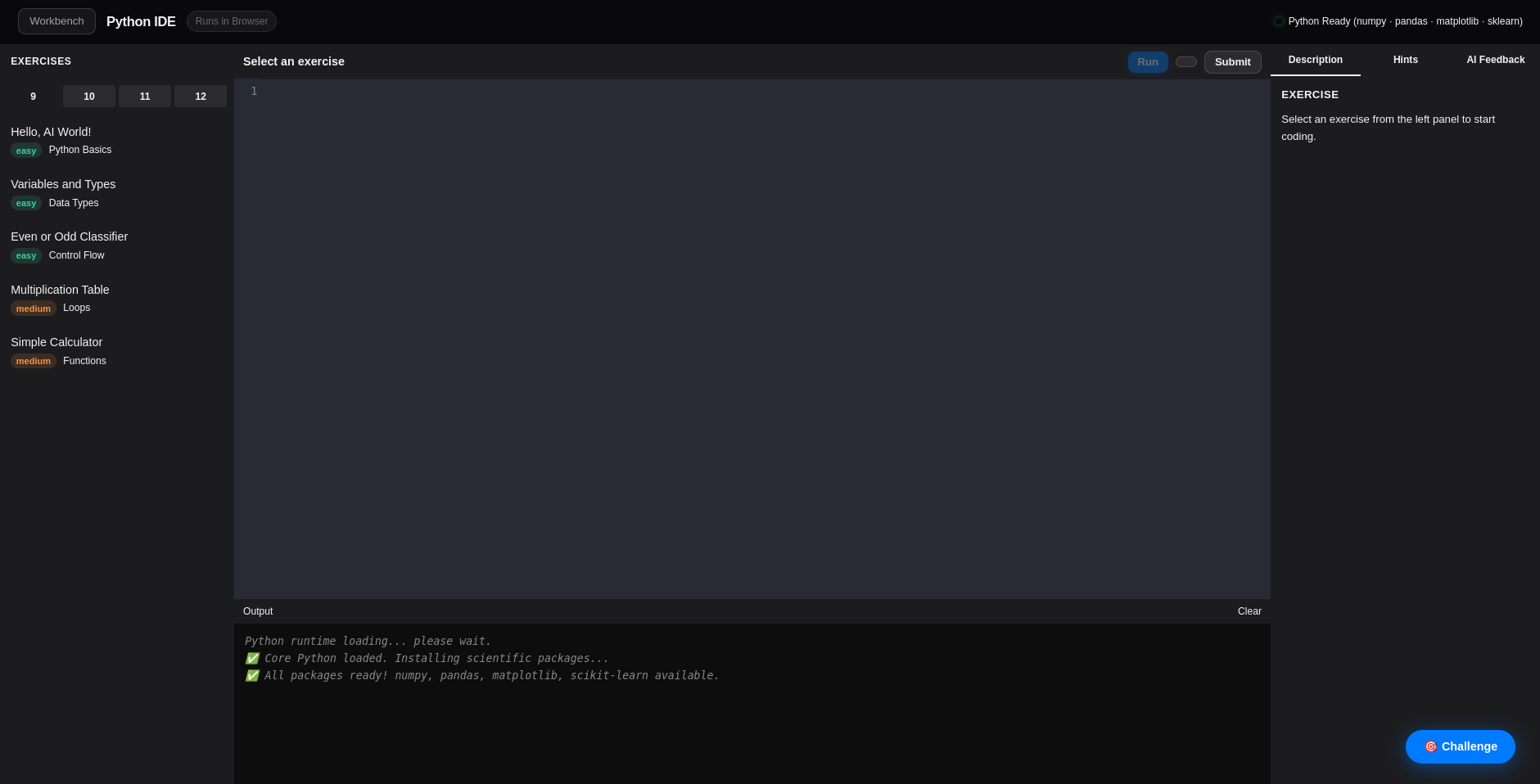
The Python IDE (Integrated Development Environment) is one of 20 tools inside SPYRAL's AI Lab. It is a fully functional Python coding environment that runs entirely in the browser — using a sandboxed Python runtime, so no code ever needs to leave the browser to execute.
Think of it as a simplified, student-friendly version of the tools professional developers use — stripped of all the complexity that doesn't matter at this stage, and focused entirely on the learning experience.
Key Features of the Python IDE
In-Browser Execution
Write Python and run it instantly — no server round-trip, no installation, no waiting. Works offline too once loaded.
Syntax Highlighting
Code is color-coded by type — keywords, strings, functions, comments. Makes code far easier to read and catch errors visually.
Starter Templates
Pre-loaded programs for common topics — loops, functions, lists, dictionaries, file handling, and intro AI concepts. Not blank-page paralysis.
Clear Error Messages
When code breaks, the error message is shown with a plain-language explanation — not just a raw Python traceback that confuses beginners.
Works on Any Device
Optimized for school computers, home laptops, and tablets. Low bandwidth, low-spec devices are fully supported.
Save Your Work
Logged-in students can save their programs. Pick up exactly where you left off — in school, at home, or on a different device.
How to Open and Use the Python IDE in SPYRAL
Getting started takes under 60 seconds:
Go to tryspyral.com and log in
New to SPYRAL? Create a free account — it takes 30 seconds and no payment details are required.
Open the AI Lab
From your student dashboard, click on "AI Lab" in the navigation. This is the hub for all 20 AI and coding tools.
Select "Python IDE" from the tool list
It's listed under the Coding & Programming category. Click to open — no loading screen, no installation prompt.
Choose a starter template or start fresh
Pick a template based on your current topic (e.g., "Loops & Conditionals", "Functions", "Lists"), or open a blank editor and start typing.
Write code, press Run, see the output
The output panel shows your results instantly. If there's an error, it shows exactly which line and why — fix it and run again.
What Students Can Learn with This Tool
The Python IDE is not a toy. It supports the full Python curriculum that students encounter from Class 9 through Class 12, across all boards. Here's a breakdown of what can be learned and practiced at each stage:
| Topic Area | What Students Practice | Level |
|---|---|---|
| Basics & Syntax | print(), input(), variables, data types, type casting | Beginner |
| Control Flow | if-elif-else, for loops, while loops, nested conditions | Beginner |
| Functions | Defining functions, parameters, return values, scope, recursion | Intermediate |
| Data Structures | Lists, tuples, dictionaries, sets — creation, access, iteration | Intermediate |
| String Operations | Slicing, formatting, built-in string methods, f-strings | Intermediate |
| File Handling | Reading and writing files, CSV handling, error handling with try-except | Advanced |
| OOP Concepts | Classes, objects, constructors, inheritance, encapsulation | Advanced |
| Intro to AI/ML | NumPy-style arrays, data manipulation concepts, simple algorithmic thinking | AI Prep |
Beyond the syllabus, students also develop something that doesn't appear in any curriculum document: the confidence to just try things. When the cost of making a mistake is zero — you just hit Run again — students experiment more, break things deliberately, and develop a genuine problem-solving mindset.
Aligned with Every Major Board's Python Curriculum
While the language is universal, each board has its own scope and sequence. Here's how SPYRAL's Python IDE supports each:
- CBSE (Class 9–12): Full coverage of the IT (402) and Computer Science (083) syllabus — from Python basics in Class 9 to OOP, data handling, and AI concepts in Class 11–12.
- ICSE / ISC: Supports Class 9–10 Computer Applications and Class 11–12 Computer Science — including all core Python concepts, file handling, and data structures prescribed by CISCE.
- IGCSE / Cambridge: Covers pseudocode-to-Python translation, algorithm design, and all IGCSE Computer Science programming components. A-Level CS students can practice higher-order concepts too.
- State Boards: Python content is typically introduced in Class 10–12 in most state curricula. The IDE's topic-based templates make it easy to practice specific chapters regardless of board.
- NEP 2020 (All Boards): NEP's mandate on Computational Thinking and AI Literacy applies nationally — the Python IDE directly fulfills this through hands-on coding practice.
Python IDE + Other SPYRAL Tools: A Powerful Combination
The Python IDE is most powerful when used alongside the other tools in the AI Lab. Here's how students and teachers can combine them:
Python IDE + ML Playground
Understand a concept visually in ML Playground, then implement it in Python code in the IDE. Theory meets practice.
Python IDE + Algorithm Visualizer
Watch a sorting algorithm animate step-by-step, then write it in Python. Bridging visual intuition to actual code.
Python IDE + Data Explorer
Explore a dataset visually, then write Python code that processes the same data. Real-world data, real code.
Python IDE + AI Tutor
Stuck on a concept? Ask the AI Tutor to explain it, get a code example, and paste it into the IDE to run immediately.
For Teachers: How to Use the Python IDE in Class
Teachers don't need to be Python experts to use this tool effectively. The IDE is designed to shift the teacher's role from "explainer of syntax" to "facilitator of thinking" — which is far more valuable at this level.
- Live demonstration: Project the IDE on a screen, write code live, and let students predict the output before you run it. Instant engagement.
- Starter-and-complete exercises: Share a partially written program (using a template), and ask students to complete the missing logic. Lower barrier than a blank editor.
- Debug challenges: Share intentionally broken code and ask students to find and fix the errors. Error-reading is a critical skill most students never practice.
- Pair programming: Two students, one screen. One types, one guides. Forces articulation of logic — which deepens understanding for both.
- Mini-project tasks: Assign small programs as homework — a simple calculator, a number guessing game, a word frequency counter. Students submit their saved code link.
The Progress Dashboard (also in the AI Lab) lets teachers see which students have been active in the IDE and for how long — giving visibility into actual coding practice, not just test scores.
Real Skills Students Walk Away With
Beyond the immediate syllabus, regular use of the Python IDE builds a set of transferable skills that matter far beyond school exams:
- Logical decomposition — breaking a problem into smaller, solvable parts before writing a single line of code
- Debugging mindset — reading error messages, isolating the cause, and fixing issues systematically rather than randomly
- Pattern recognition — seeing when a problem is similar to one solved before and adapting an existing solution
- Persistence under ambiguity — coding rarely works on the first try; students learn to try, fail, and try differently
- Communication of logic — writing code is, fundamentally, writing precise instructions — a skill that translates to every field
These are the competencies that NEP 2020 describes when it talks about 21st-century skills and computational thinking. They are not built by reading Python syntax from a textbook. They are built by writing code, running it, and doing it again.